Frequently Asked Questions - FAQ
-
Q: When I start Timaeus by clicking on the icon on my desktop, the application shows for about one second and then disappears. I can't seem to keep the window open.
A: What you are seeing is the initialization sequence for Timaeus, which then minimizes to the system tray and monitors the sky until called (next to your clock on the lower right hand side of the screen). You should see two astrological glyphs: one for planetary hour and the other showing the rising sign in the system tray (if not, make sure you click customize and then select "show icon and notifications" for your tray options). Double click on the icons to show the current sky for your location or right click for other options.
-
Q:When I start up Delphic Oracle 9 (Windows) I get a blank screen with a green circle in the center. How do I fix this?
A:The program isn't able to find the ini files that store the settings that has the configuration of the FMX objects in memory. The bad install could be due to a number of factors such as installing on a different drive other than C:, or using OneDrive (which I strongly discourage). You will have to do a reinstallation. First make sure that Delphic Oracle isn't running then delete the Settings directory as shown below.
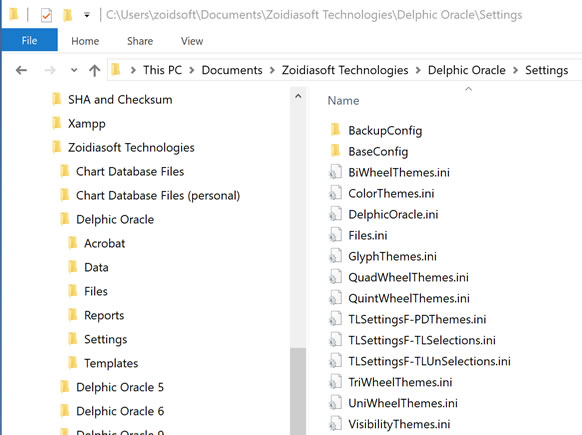
Then reinstall making sure to use the C: drive. If you make modifications to where some files exist (such as the Terran Atlas directory (which I sometimes store on the D: drive), make sure you set the correct path (in the Main Options - F3 on the Paths tab and Terran Atlas tab) to the *.CDS files (Client Data Set) so the chart setup can find where these files are when you do a time zone and latitude/longitude lookup.
There is one problem with the XPF version of DO that uses ini files (for cross platform compatibility) which happens when ini files are improperly closed and therefore corrupted. A dead giveaway this has happened is when the main screen comes up mostly blank with a green circle in the center where the chart should be.
The fix for this is to delete the Settings directory in the Documents folder as shown below and reinstall Delphic Oracle from scratch… (make sure DO isn’t running while deleting this directory as it will replace the files with corrupted copies).
You will notice that I have a BackupConfig folder and this is what I use to make sure that I don’t have to start over from scratch when it happens to me. This BacupConfig directory allows me to just shut down the program, delete the files in the Settings directory, then copy the BackupConfig ini files into the Settings directory allowing me to bypass uninstall and reinstall. Much quicker. You can create one for this purpose then every so often copy those files over to back up your settings in case something breaks. BaseConfig is what I use to generate a new install for new users. But all the ini files in this directory should be deleted if you see this green circle.
If you're wondering where files should be (Windows 10/11 in particular has a different set of environment vars changing directory location due to OneDrive (which I recommend you remove if you value your privacy). Here's Why. There are several screen shots in Windows explorer here if you want to check what it should look like.
-
Q: How do I back up my chart files (and restore them after a crash)?
Chart files have the extension of *.zcf (such as Celebrities.zcf) and can be located in any directory of your choosing. The default location is below...
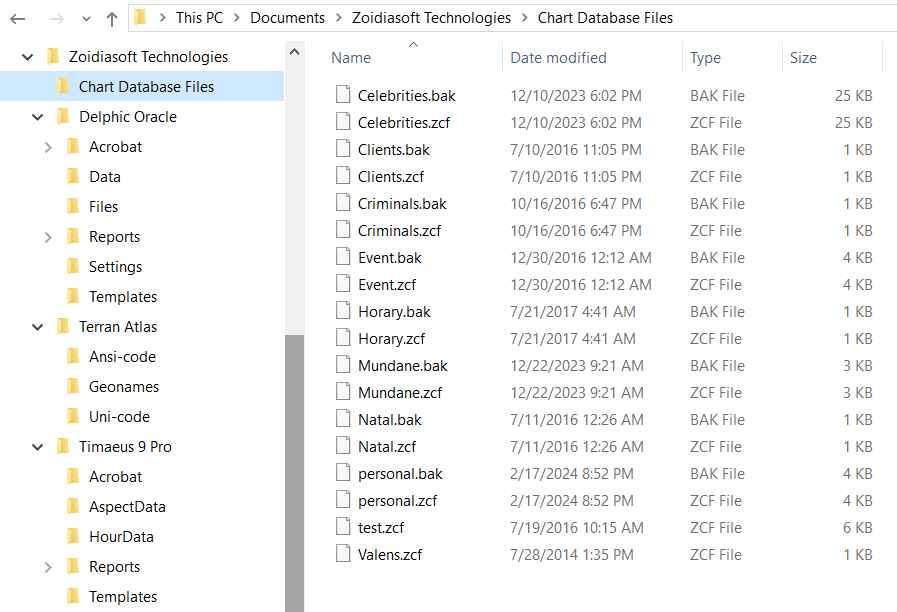
You can use the main menu to backup files or have it done automatically in your main settings (F3) every 10 minutes... These backup files are the same as *.zcf, but have the extension *.bak. You can rename the extension to .zcf if you wish.
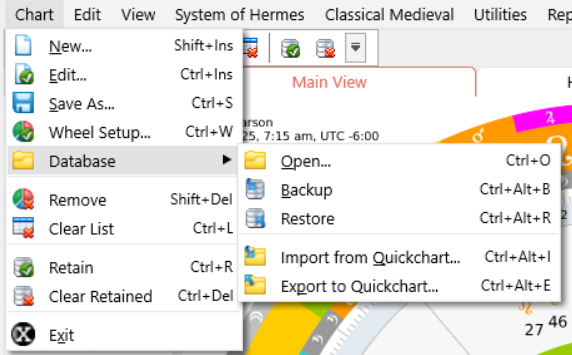
But if you're reinstalling, then you will have to recreate any databases that are not the original named 6 zcf files so that the program will know where to look. To do this, you need to create a new blank file in the directory of your choosing. For example, I like to keep my files separate, so I created one called "personal.zcf"...
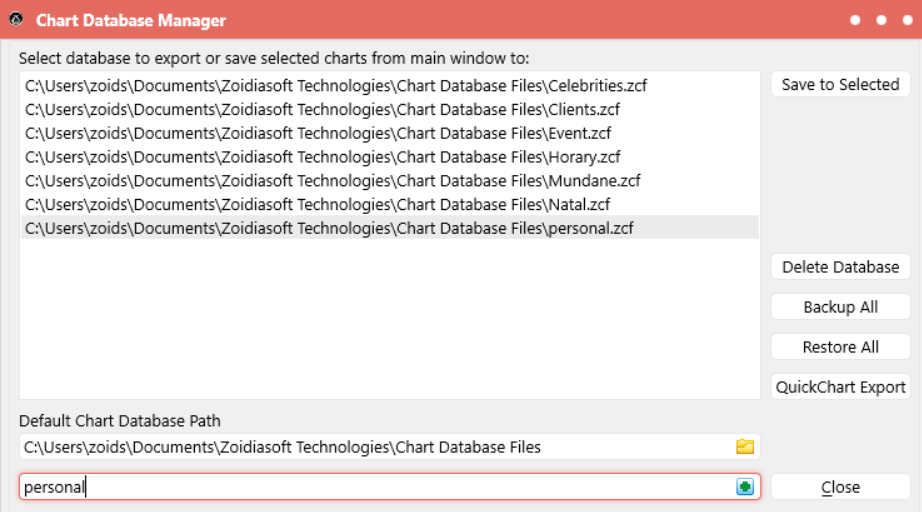
This new file has no data, so it is safe to overwrite. You just take the old zcf file you have backed up from somewhere else, or you can delete the personal.zcf file and rename the personal.bak to personal.zcf. Then your charts should show up in the new database.
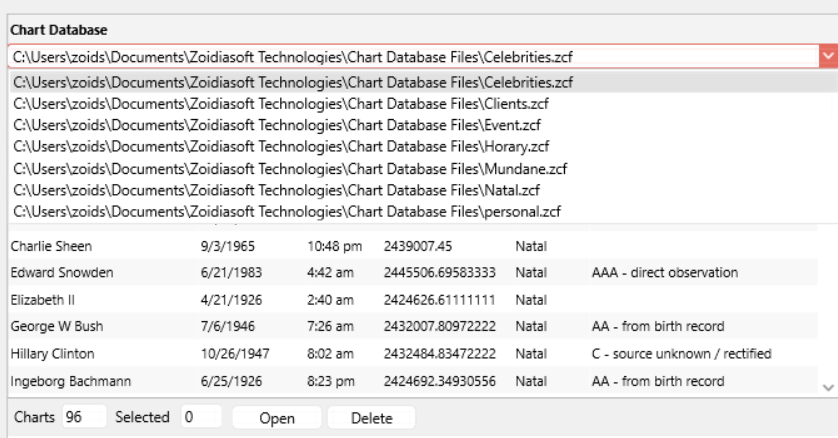
The same process goes for every database you create.
-
Q: I can't seem to output a Report or get an Acrobat file from Delphic Oracle XPF on my mac. Why is this?
A: If you've just installed Delphic Oracle 9 on your macOS, there's still a few initialization steps you should take. I had to change installers and now use Packages to install instead of Iceberg. There is a directory in the Shared folder next to your User folder on your mac that you can copy into your User folder (seen below)...
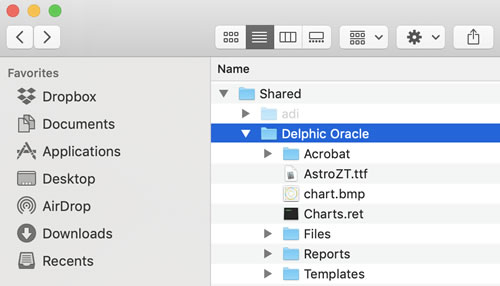
This folder should be copied completely into your home directory. If you've already run Delphic Oracle XPF, then there will already be a folder by the same name in that location, just overwrite that directory with the contents of the Delphic Oracle folder from the Shared directory. The Shared folder needs to have the Delphic Oracle folder because charts.bmp is generated there but you can delete the remaining folders and files as only the Delphic Oracle folder needs to be there.
You might also be missing permissions to write to the Shared/Delphic Oracle/ directory if you see something like this...
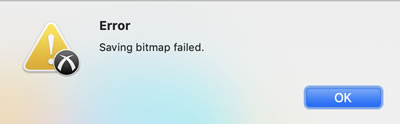
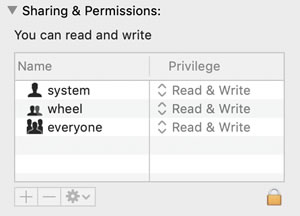
In this case, the Shared/Delphic Oracle/ folder needs to have the permissions set. Selecting the folder and right clicking "get info" in the popup menu will have permissions show up at the bottom of the window which you can change to "read and write".
The reason for this is because I don't have the ability to determine the name of the users directory from inside of Packages yet. I do however have the ability to find this out from within Delphic Oracle itself. In the future I may include these files into a resource file instead since I'm not familiar with the scripting capabilities inside of Packages and it is not well documented.
After successful completion of these steps you should see this window after clicking on Report | Acrobat on a mac...
-
Q: When I start Delphic Oracle XPF on my laptop the graphics are slow and sometimes parts of windows overlap or appear black with incomplete drawing. I'm running Windows 7 64 Professional, Intel i7 2.5GHz, 8GB RAM, NVIDIA Quadro 2000M Graphics. The machine was new in 2012. Is there anything I can do to speed things up and make the program look better?
A: My first suggestion is to change your power management on your laptop. Most laptops have a lower power setting to save on battery, so try changing the setting to "high performance". You might also try this suggestion to force Intel HD graphics and toggle the Optimus enabled setting (sorry I don't know where those are on your machine):
I can confirm a similar problem with a Dell M4600. It has NVidia 2000M graphics, and Optimus is enabled. If I force Intel HD graphics, it works. But with the NVidia graphics, the application flashes alternately between black and the image. (But the About Dialog displays correctly). The same binary works normally on a desktop with NVidia 2000 graphics card. This does suggest that the issue is related to the NVidia xxxM (i.e. Mobile) chipset and/or the Optimus feature.
Response: Many thanks for the suggestions. I usually have high performance settings on when the power is plugged in. I have yet to experiment with the Optimus settings (not even sure what they are) but I did manage to find a workaround in the meantime. I was playing with compatibility mode and after disabling the visual themes and reducing the colour scheme to 256 colours (not necessary but I threw it in for a good measure) everything seems to be running smoothly. Once again thank you for looking into this!
For users with different machines, try the following in order:
- Depending upon your version of Windows, find compatibility mode and try to turn off visual themes if this option is available.
- Mac users should try to optimize your mac for gaming since this will also improve visual performance.
- Try reducing the color scheme to something like 256 colors instead of 16+ M. Fewer colors means less processing for the graphics card.
- Try reducing the screen resolution. Fewer pixels means less strain on the graphics card to manage the display and faster rendering.
- If the above doesn't work, its probably time to upgrade the graphics card on your machine. Please check system requirements first to make sure Delphic Oracle XPF can run. It was written in a high end graphics environment. You might want to upgrade your graphics card anyway since the visuals are quite spectacular compared to other software. If money is tight, you might consider overclocking your graphics card for free.
-
Q: I changed the font size in the chart wheel and the changes don't seem to save, whenever I change the sizes they revert back to the defaults.
A: This is happening because you've not set AutoSizeFont = False. If it's set to True at the top of the Wheels tab, then your settings will be based upon the difference between the InnerRingRadius and OuterRingRadius values. There are also some fonts such as the glyphs in the decan and bound wheels that depend entirely upon the difference in these two values. In the latter case you must change those values to be either larger or smaller in order to get the font size you want which will be set automatically not to bleed over the bound lines.
Q: I got the Delphic Oracle program recently. By exploring the program, and how I am an expert in primary directions, I realized that in the case of inverse directions that these are not being calculated correctly. When I make the opposition of my Saturn (promissor) to the conjunction of my Moon (significator) I found in the program a difference of two years in arc of direction. When I calculate the same direction in other programs (insert list of programs here), they all give values equal to my calculations. So this leads me to believe that there is a problem with your method of inverse directions! But the direct values are right. These are identical with other programs.
A: There's a distinction made in Delphic Oracle between "traditional converse" and what Martin Gansten calls "neo-converse" directions. I have programmed this difference into Delphic Oracle. Please make sure that you have the right selection in the main Primary Direction window under Direction, and don't confuse the modern converse directions with traditional converse directions. If you want Delphic Oracle values to match what is in other programs, make sure you are using "neo-converse". This will show as "NC" under the direction type column. Traditional converse directions are simply labeled "C" in the list and represent a different arc. This difference stems from historical confusion over the definition of converse direction. Modern converse directions include arcs against the diurnal rotation (before birth in time) whereas traditional converse reverses the roles of significator and promissor by directing the significator in the diurnal rotation (there is no such thing as a traditional converse direction against the diurnal rotation). Because the significator and promissor are usually at different latitudes, (and different direction types use different reference frames) the arc of direction would not be the same in these two types of converse direction.
If you suspect that there's an error in a listed primary direction, just pull down the splitter near the top of the PD window and you will see two memo fields (one for significator and one for promissor). Click on the direction in the M/Z column and the internal values for that direction will show if you have "include debug info" checked (Press F5, on the Selections tab of Primary Directions).
-
Q: For some reason Delphic Oracle/Timaeus shows the Moon in a slightly different position than what is stated in Solar Fire. Is this a bug?
A: No. You most likely have topocentric positions checked in the General Options (Press F3 and check the General Tab). Most software uses geocentric positions which is a position as seen from the center of the earth (in molten lava). For the most part the difference between these two positions is negligible, but the Moon is close enough to create a visible parallax that will show up to 1 degree difference between geocentric and topocentric positions. If doing lunar returns, I strongly suggest you research the different coordinates as this can lead to a two hour difference in return times and lead to a different sign rising in many cases. I tend to use topocentric positions for the most part because one is born on the surface of the earth not in the earth's core. However, there is a theoretical problem of how astrological influence arises (if it even exists as an efficient cause) and what it is that mediates between the stars and the observer (birth location), especially when planets are below the horizon.
-
Q: I tried installing your software and I get the error: Installation Error: 1311 source file not found. What should I do?
A: This error is caused by invalid CD-drive allocation. You can get around this error by copying the contents of the installation CD-ROM to your hard disk and perform the setup from HD and this will bypass the error. If you are more technically inclined, set the AllocateCDRoms key in:
HKEY_LOCAL_MACHINE\SOFTWARE\Microsoft\WindowsNT\CurrentVersion\Winlogon
... to value=0.