Delphic Oracle XPF Astrology Software
Order Online
 Delphic Oracle 9 License: $100.00 Delphic Oracle 9 License: $100.00 |
Program Overview

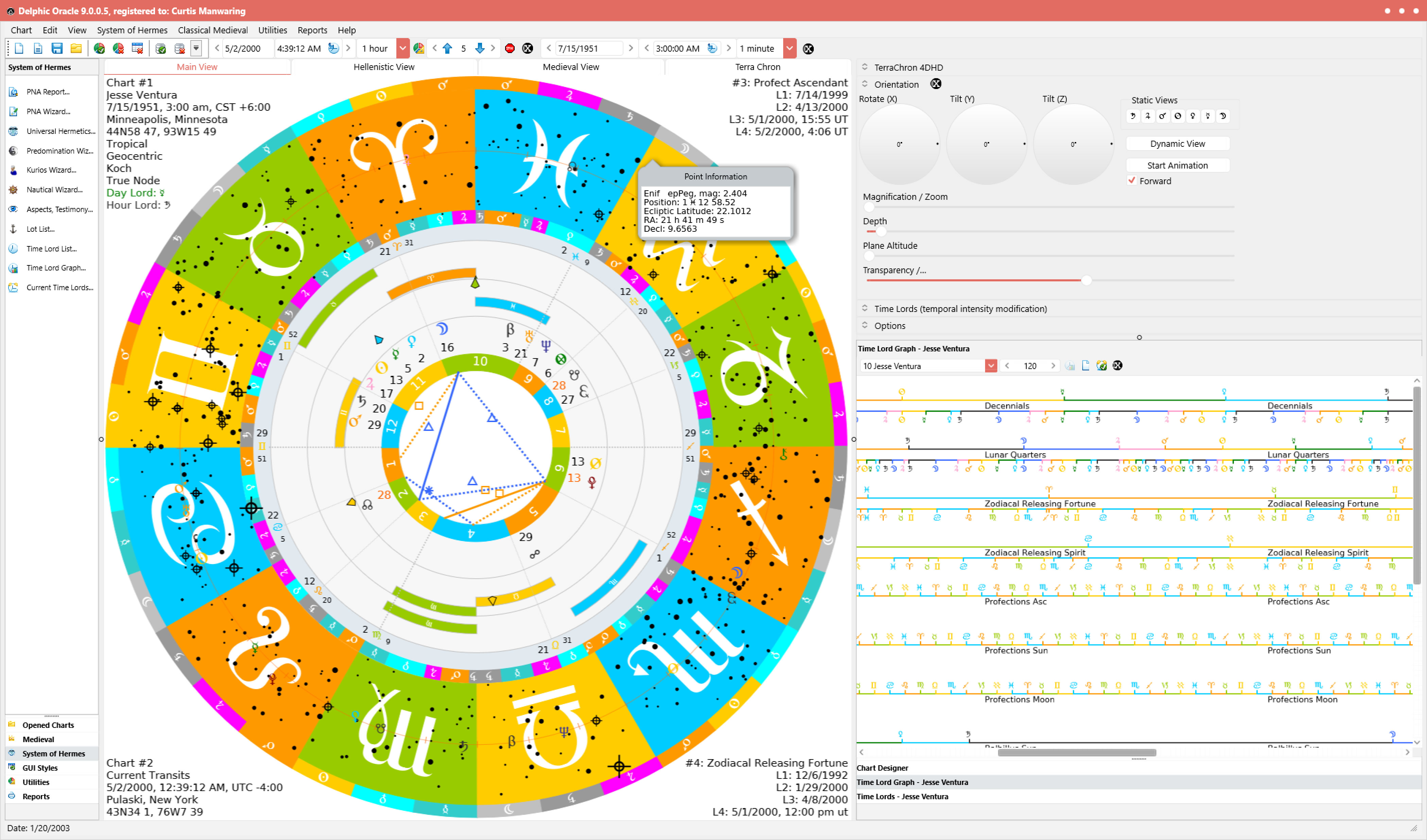 Delphic Oracle software is based upon the translations of historical astrological texts from the Hellenistic era through Medieval, Renaissance and up to the early Modern era and includes various techniques from such ancient authors as Vettius Valens, Antiochus, Hephastio, Dorotheus, Porphyry, Rhetorius, Critodemus, Firmicus Maternus, Ptolemy, Masha-Allah, Ibn Ezra, Bonatti, Regiomontanus, Lilly, Placidus and many others. The author (Curtis Manwaring) has worked with scholars in the field such as Robert Schmidt, Benjamin Dykes, PhD and others to develop software that is true to the intents of the original astrologers of antiquity for the past 20 years and was involved in the Hellenistic field from the beginning of the translation effort known as Project Hindsight. Hank Friedman writing for the Mountain Astrologer has called Delphic Oracle "the gold standard of Traditional Astrology programs, far and away more powerful and better designed than any other software."
Delphic Oracle has been designed in two different frameworks: XPF (Cross Platform) and WL (Windows Library). The Cross Platform version runs on both Windows and macOS, and has superior graphics. Delphic Oracle WL is a less expensive alternative. These versions are explained below with a software feature matrix to help you understand the differences between Delphic Oracle XPF, Delphic Oracle WL and Timaeus Pro. The links in the left-most column describe each software section in more detail. A green checkmark under the program column indicates availability of that item in the program.
Software Feature Matrix
| Operating System's | Timaeus Pro | Delphic Oracle WL | Delphic Oracle XPF |
|---|---|---|---|
| Windows (desktop / tablet) |  |
|
|
| MacOS (windows emulation) | |
|
|
| MacOS (native) | |
||
| Features | Timaeus Pro | Delphic Oracle WL | Delphic Oracle XPF |
| TerraChron 4DHD Astrocartography | |
||
| 3D & HD Graphics | |
||
| Batch Reporting | |
||
| Tip Wizard | |
||
| Time Wheels | |
|
|
| Schmidt's "System of Hermes" | |
|
|
| Hellenistic Time Lord Procedures | |
|
|
| Interactive Time Lord Graph | |
|
|
| Interactive Graphic Ephemeris | |
|
|
| Autogenerated Charts | |
|
|
| Advanced Chart Configuration |
| |
|
| Advanced Chart Utilities | |
|
|
| Advanced Medieval Module | |
|
|
| Primary Directions | |
|
|
| GUI Styles | |
|
|
| Terran Atlas | |
|
|
| Swiss Ephemeris | |
|
|
| Printing, Reports, & Delineations | |
|
|
| Portable Registration | |
|
|
| Cross Application Upgrades | |
|
[1] |
| System Tray Alerts | |
Notes:
[1] Not necessary because this is the highest level application license.